

Operational Policies
Warn, require approval, or block matched agent commands before they run.
Operational Policies protect known high-risk command patterns. Enrolled agents evaluate active rules before guarded commands run and return the configured decision to the employee.
Use Policies for controls that can be expressed as a stable command pattern, such as:
- destructive infrastructure commands;
- production deployment commands;
- changes to identity and access;
- commands that alter or remove persistent data;
- unapproved package or service usage.
Policy outcomes
| Outcome | Employee experience |
|---|---|
| Allow | The command continues and the decision can be recorded |
| Warn | The employee sees the policy warning before continuing |
| Require approval | The action pauses until an authorized Owner approves or denies it |
| Block | The command does not run |
Choose the least restrictive outcome that meets the organization's requirement. Use warnings to educate, approvals for deliberate human review, and blocks for operations that should never run in the matched scope.
Create a policy rule
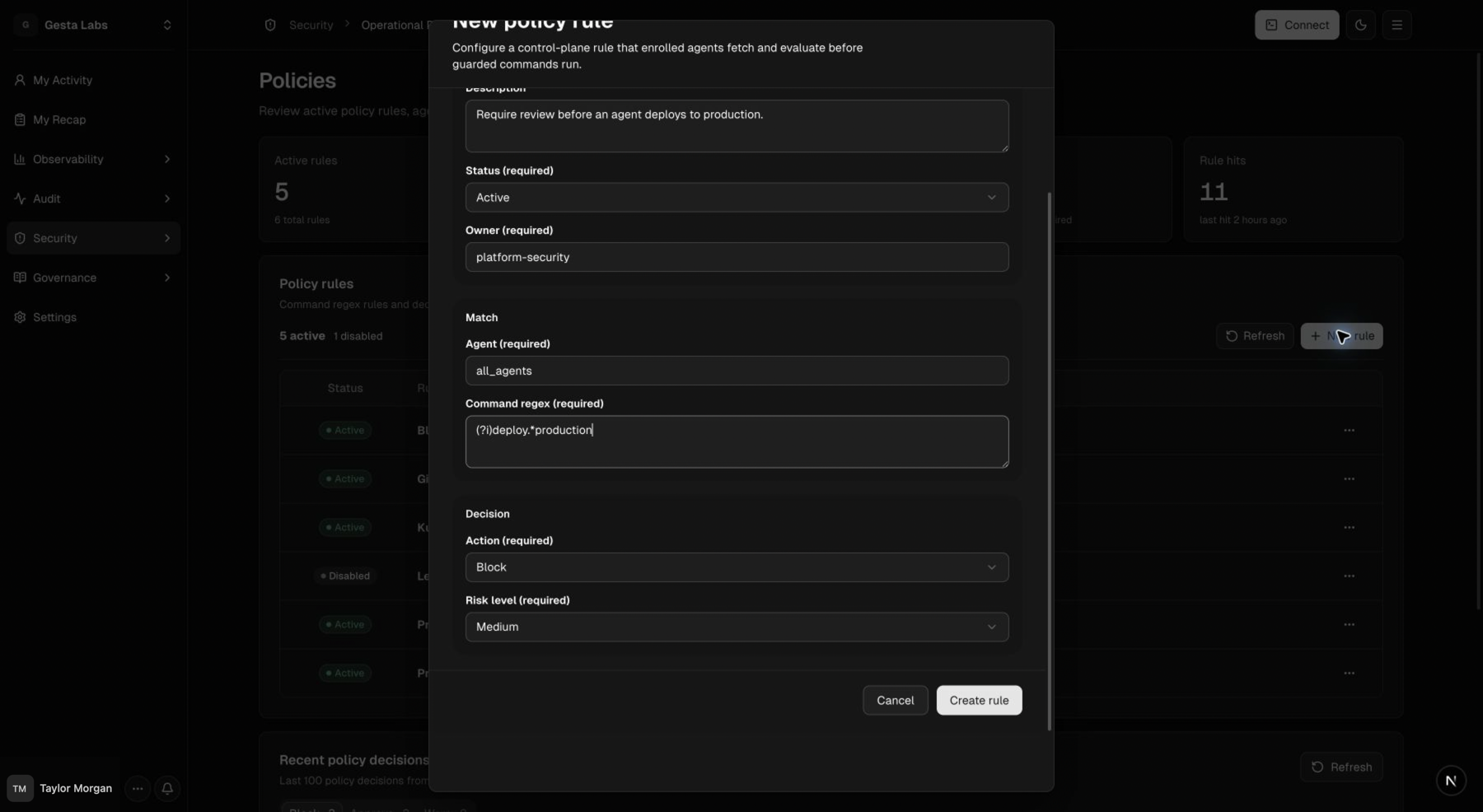
Open Security → Operational Policies, then select New rule.
Configure:
- Name: a clear description of what is protected;
- Description: why the organization needs the rule;
- Status: Active or Disabled;
- Owner: the team responsible for the policy;
- Agent: the agent scope;
- Command regex: the command pattern to match;
- Action: Warn, Require approval, or Block;
- Risk level: the severity shown during review.
Write a useful command pattern
A good rule is narrow enough to avoid unrelated commands and broad enough to cover realistic variations.
Before enabling a restrictive rule:
- list the command forms employees and agents actually use;
- account for flags, whitespace, aliases, and resource names;
- test the pattern against harmless examples;
- start with Warn when the expected match set is uncertain;
- review decisions and refine the expression;
- move to approval or blocking only after the scope is understood.
Avoid a catch-all expression that could interrupt normal development work. Create separate rules when operations have different owners, risk levels, or required outcomes.
Review policy decisions
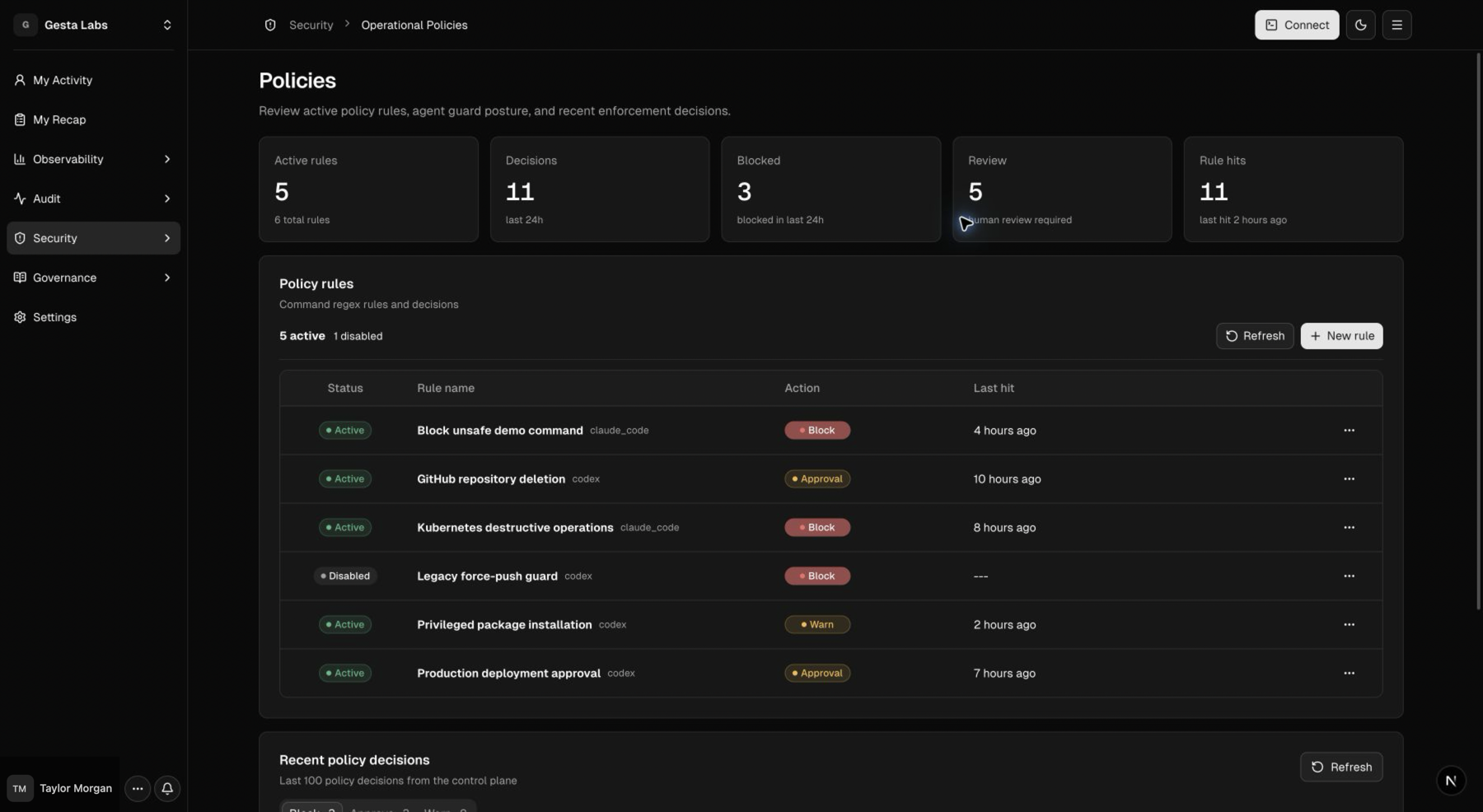
The Policies page shows active rules and recent decisions. Open a decision to review:
- matched rule;
- employee and agent;
- resource and action;
- decision time;
- reason;
- approval status, when applicable.
Respond to an approval request
When a rule requires approval, the action remains paused while an authorized Owner reviews it.
Before approving:
- confirm the employee and target environment;
- confirm the exact resource and scope;
- check that the requested timing is appropriate;
- review the expected impact and recovery plan;
- approve only when the request matches the intended change.
Deny the request when its target, impact, or ownership is unclear. The employee can revise the task and submit a new request with the missing information.
See Review approval requests for the full Owner review checklist, expiry behavior, and decision guidance.
Use Policies with Organization Library
Policies are strongest when the risky operation has a recognizable command pattern. Organization Library is better for open-ended expectations such as gathering context, communicating with owners, preparing a rollback plan, or reporting verified outcomes.
For example:
- Organization Library tells the agent to identify the exact target and request confirmation before destructive work.
- An Operational Policy requires approval when a matched destructive command is about to run.
Together they provide consistent guidance and a defined decision point.
Offline behavior
The Gesta runtime keeps the latest validated active rules available locally. If the organization service is temporarily unreachable, it can continue evaluating the most recently synchronized rules.
Keep machines connected so rule changes and approval state propagate promptly.
Test a policy safely
Test new expressions with non-destructive commands or a disposable test environment. Confirm:
- the intended command matches;
- a similar safe command does not match;
- the employee receives the configured outcome;
- the decision appears in the Console;
- restrictive outcomes do not affect unrelated work.
Never validate a deletion policy by performing an unconfirmed change against a real environment.