

Review approval requests
Make informed decisions when an Operational Policy pauses a matched command.
An Operational Policy can require Owner approval before a matched command is allowed to continue. Approvals give the organization a deliberate checkpoint for known high-risk operations.
When an approval is created
An approval request is created when:
- an employee's agent prepares a command;
- the command matches an active Operational Policy;
- the policy outcome is Require approval;
- Gesta pauses the operation and records the request.
The employee cannot treat silence or an expired request as approval.
Review the request
Open Security → Operational Policies, select the Approve decision tab, and verify:
- the employee and agent;
- the complete command, not only a shortened preview;
- the target environment and resource;
- the stated reason for the operation;
- the policy that matched;
- the request creation and expiry time;
- the expected impact and recovery plan.
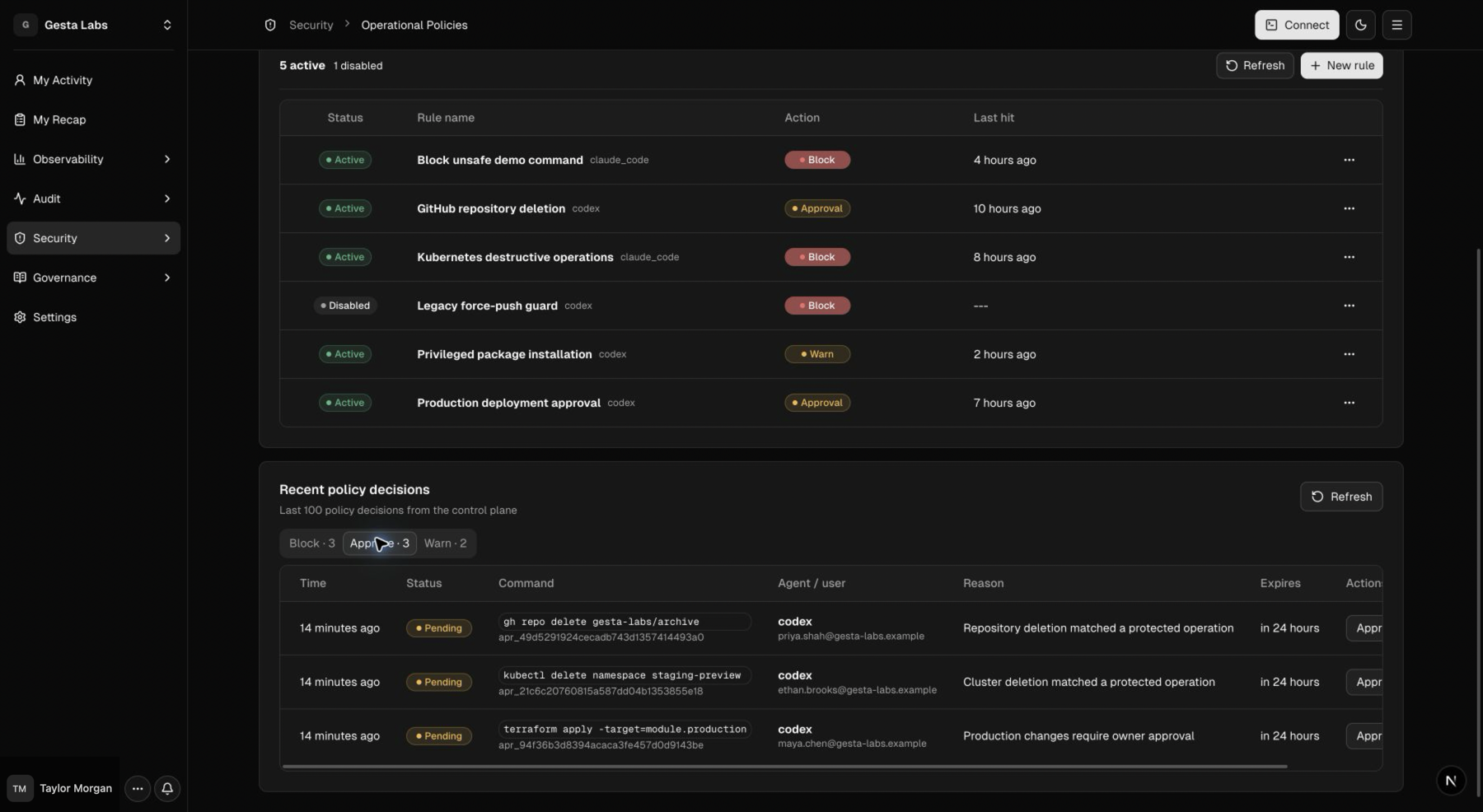
For a destructive SRE operation, do not approve until the exact environment, target, scope, and impact are confirmed. The employee must explicitly confirm the deletion before it proceeds.
Approve or deny
Approve when the request is expected, sufficiently scoped, authorized, and safe to perform under company process.
Deny when:
- the target or impact is unclear;
- the command is broader than the stated task;
- the request uses the wrong environment or identity;
- required review or confirmation is missing;
- the operation is no longer needed;
- the request has become stale.
Denial is a safe outcome. The employee can correct the task and create a new, more precise request.
Requests that expire
Expiry prevents an old decision from authorizing work at a later time. If a request expires, the employee should re-check current state and generate a new request rather than attempting to reuse the old decision.
Review recent decisions
Use the policy decision view to review Block, Approve, and Warn outcomes. Look for:
- repeated denials caused by unclear scope;
- frequent approvals that may need a better workflow;
- policies matching unrelated commands;
- teams that need clearer Context Rules;
- requests where the reason does not explain the business need.
For configuration and staged rollout, see Operational Policies, which shows the canonical rules and recent-decisions view.