

Organization Library
Define company guidance once and deliver it to every enrolled employee agent.
The Organization Library gives AI agents the operating knowledge they need to work inside your company. Owners define a Context Rule once, and Gesta supplies the matching guidance to every enrolled employee agent.
This is useful for expectations that are difficult to express as a fixed list of commands:
- confirm destructive or irreversible work;
- prepare rollback and verification steps for production changes;
- follow incident communication requirements;
- respect data-handling boundaries;
- use approved services and dependencies;
- distinguish verified results from assumptions.
Why use Organization Library
Repository instruction files are useful for project-specific guidance, but company standards often apply across many repositories, machines, and agent types. Copying the same text everywhere creates duplicate, stale, and inconsistent versions.
Organization Library provides one managed source for the standard. When the organization updates an active rule, enrolled agents receive the updated guidance without requiring every employee to edit local files.
How a Context Rule is applied
- An Owner creates and activates a Context Rule.
- Gesta distributes active rules to enrolled employee machines.
- When an employee submits a prompt, Gesta checks which rules match.
- The agent receives the matching organization guidance with the task.
- Gesta records that the rule matched without requiring the employee to copy the standard into the prompt.
The employee continues working in Codex or Claude Code. Organization Library does not replace the original prompt.
Create a Context Rule
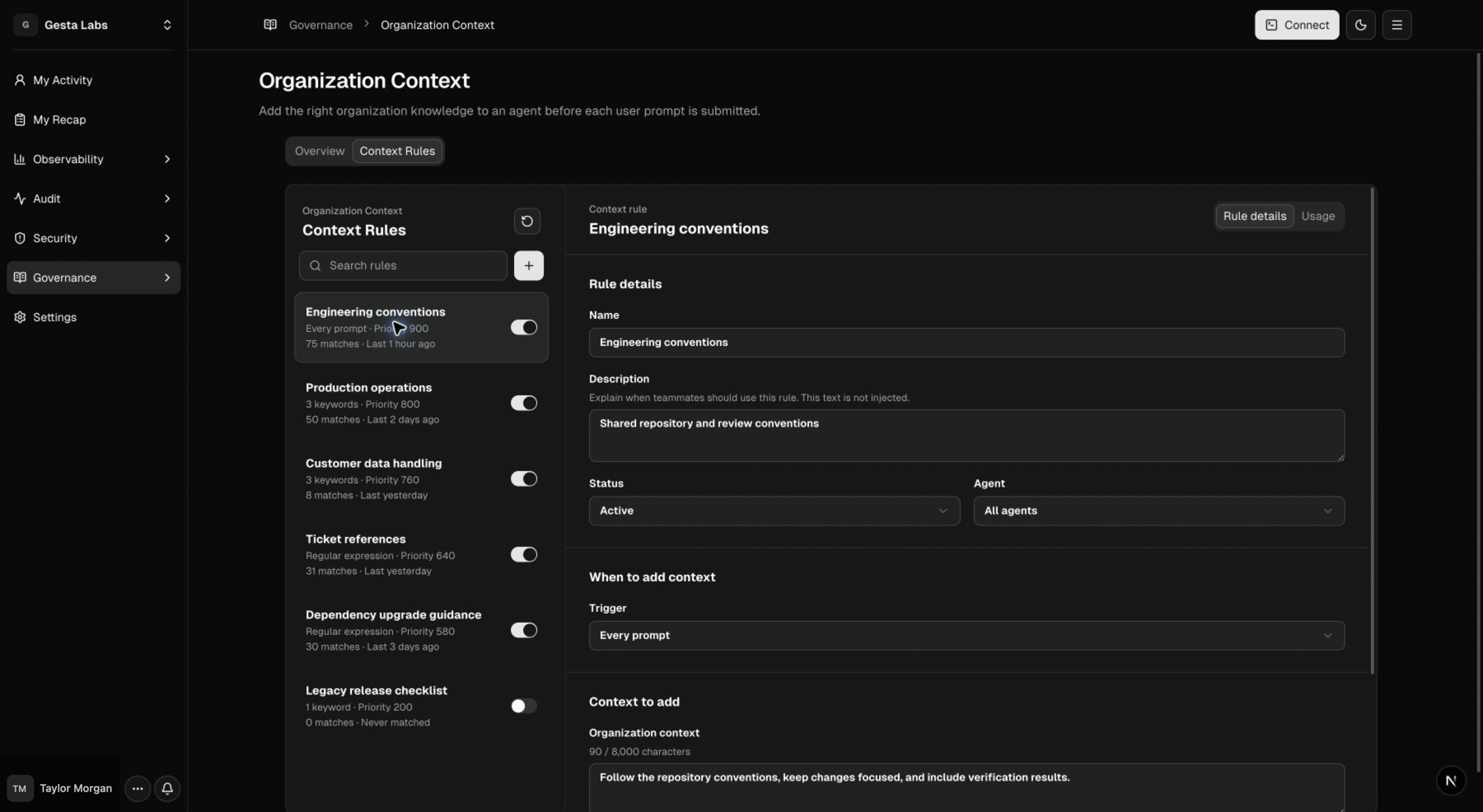
Open Governance → Organization Library, select Context Rules, then use the New rule action.
Basic information
- Name identifies the standard in the Console.
- Description helps Owners understand when to use it. It is not sent to the agent.
- Status controls whether the rule is distributed.
Choose when it applies
| Trigger | Use it for |
|---|---|
| Every prompt | Baseline requirements such as accurate reporting or general engineering standards |
| Keywords | Scenarios with recognizable language, such as production, incident, delete, access, or customer communication |
| Regular expression | More precise combinations, aliases, naming conventions, or multilingual patterns |
Keyword matching is case-insensitive. A keyword whose edges use ASCII letters,
digits, or underscores matches at word boundaries. For example, PR matches
PR #42 but not prompt, and deploy does not match deployment. Non-ASCII
keywords such as Chinese text can match inside continuous text. Use a regular
expression when partial-word matching is intentional.
Choose which agents receive it
Apply the rule to all supported agents or limit it to a specific agent type. Use All agents when the company expectation should remain consistent across Codex and Claude Code.
Write the organization context
Write a direct operating standard. Tell the agent:
- what situation it is in;
- what it must consider;
- what information it should obtain;
- what it should report to the employee;
- when it must pause and request a decision.
Keep the content focused. If several independent standards apply to different scenarios, create separate rules so each one can be managed and measured.
Set priority
Higher-priority rules are supplied first when several rules match the same prompt. Reserve the highest priorities for organization-wide baselines and critical operating expectations.
Example: confirm a CloudPilot deletion
An organization creates this rule:
Before any destructive or irreversible operation, identify the exact environment, target, scope, and expected impact. Explain the operation to the employee and obtain explicit confirmation before proceeding.
The rule is activated once and distributed to all enrolled employee agents.
An engineer then asks:
Inspect the CloudPilot pre-production environment and delete the
cloudpilot-agentPod.
With the company standard available, the agent should:
- confirm that the target is CloudPilot pre-production;
- resolve the Kubernetes context and namespace;
- identify the exact
cloudpilot-agentPod; - explain the target and expected impact;
- stop and request explicit confirmation;
- continue only after the engineer confirms.
The company does not need to predict the exact command the AI will construct. It defines the operating standard once, and enrolled employee agents receive the same expectation wherever the scenario appears.
This interaction occurs inside Codex or Claude Code rather than on a Console page, so it remains a behavioral example instead of a product screenshot.
Multiple matching rules
More than one Context Rule can apply to the same prompt. A production database change might receive:
- the company's completion-reporting standard;
- production-change requirements;
- data-handling guidance;
- access-control expectations.
Use priority to establish a predictable order. Keep each rule independently useful and avoid repeating the same instruction in several rules.
Review rule usage
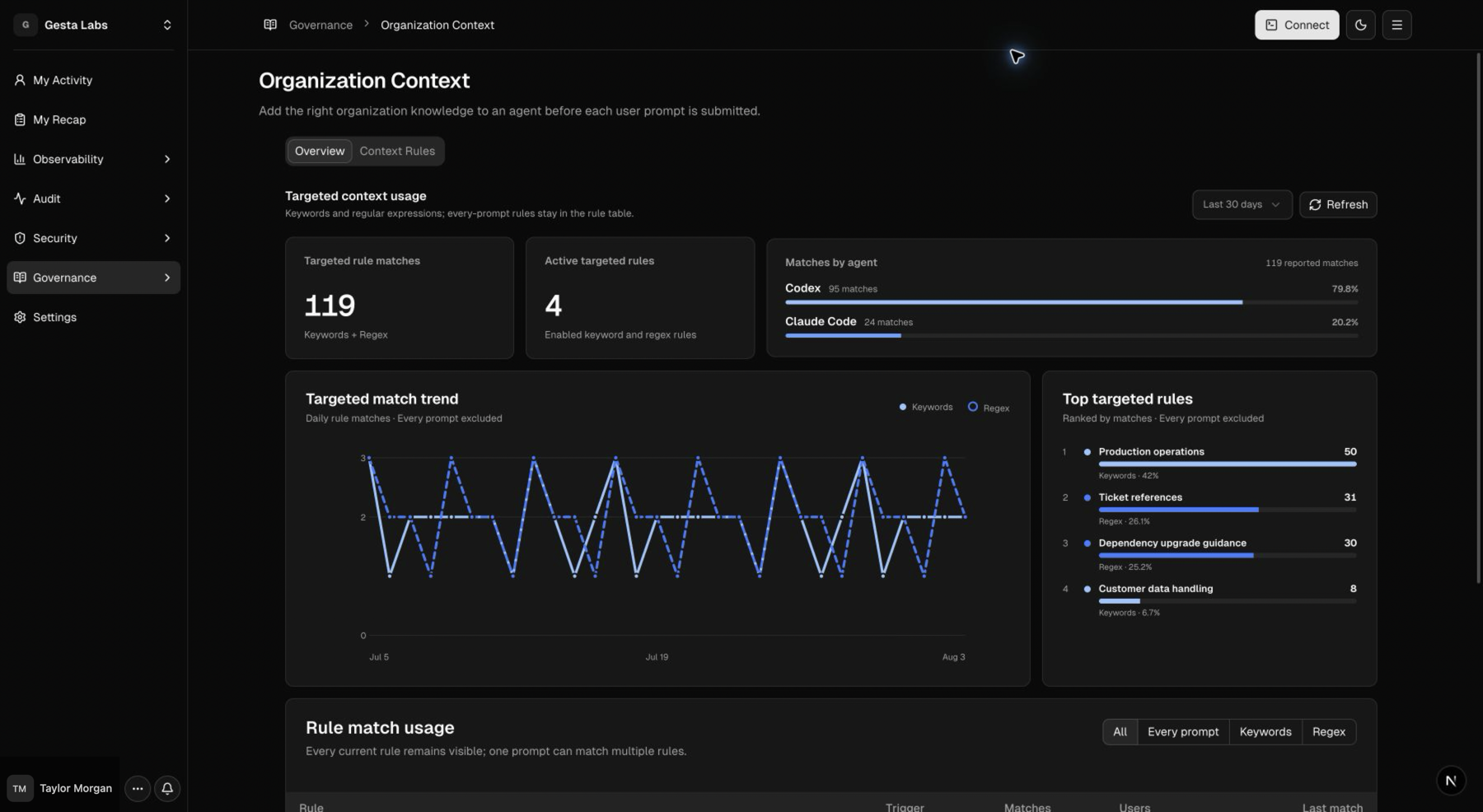
The Context Rules list shows whether a rule is active, how it is triggered, its priority, match count, and latest match. Use this information to find:
- rules that employees rely on frequently;
- rules that never match and may need a better trigger;
- overlapping rules that should be simplified;
- standards that need clearer wording.
Organization Library and Policies
Organization Library guides open-ended agent work. Use it when the desired behavior cannot be reduced to a stable list of commands.
Use Operational Policies when a known command pattern must warn, require approval, or be blocked. Use Sensitive Data when prompt content must be recorded, warned, or blocked at the data boundary.
These capabilities work together: Context explains how the organization expects work to be handled, while protection rules apply a defined outcome to matched activity.
Test a rule safely
After saving a rule:
- confirm that it is Active;
- confirm that the selected agent type matches the employee's agent;
- start a new agent session;
- submit a prompt that clearly matches the trigger;
- stop before performing any real production or destructive change;
- verify that the agent follows the supplied standard;
- return to the rule and confirm that its match information updates.
If a rule does not apply, see Troubleshooting.
For standards you can adapt, continue to Context Rule recipes.